
Hey there, tech enthusiasts! As a supplier of Computer UPS Online, I often get asked a bunch of questions about UPS systems. One question that pops up quite a lot is, "Is it possible to expand the capacity of a computer UPS online?" Well, let's dive right into it and find out.
First off, let's understand what a UPS (Uninterruptible Power Supply) is. In simple terms, a UPS is like a safety net for your computer. It provides backup power when the main power source fails, giving you enough time to save your work and shut down your system properly. There are different types of UPS systems, but we're mainly talking about online UPS here. Online UPS systems are known for their high - end performance and continuous power supply.
Now, back to the big question. Is it possible to expand the capacity of a computer UPS online? The short answer is yes, it is often possible, but it depends on a few factors.
Factors Affecting Capacity Expansion
1. The Design of the UPS
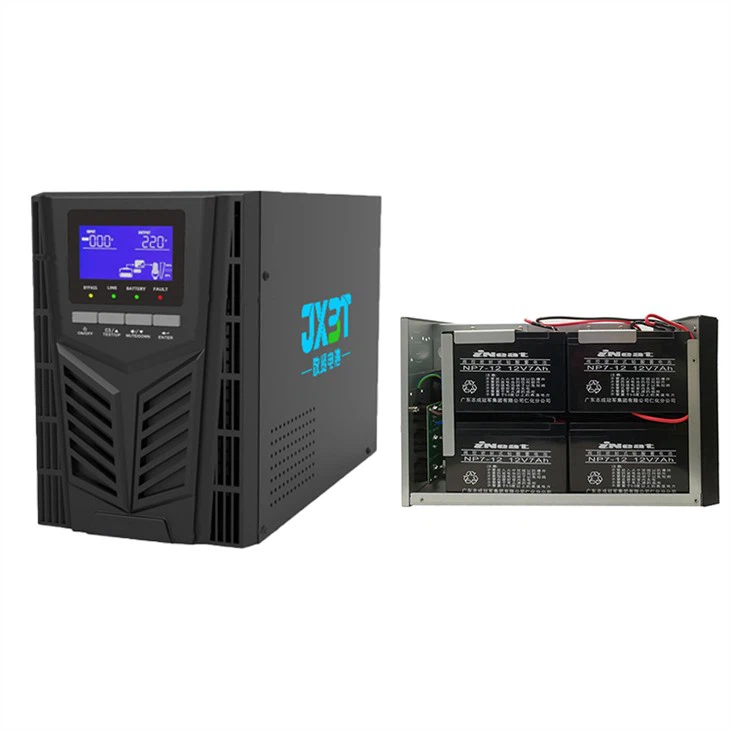
Not all online UPS systems are designed to have their capacity expanded. Some models come with built - in expansion capabilities, while others don't. When you're looking to expand the capacity, you need to check the user manual of your UPS. If it's an expandable model, the manual will usually give you details on how to go about it. For example, some UPS systems allow you to add additional battery packs. This is a relatively straightforward way to increase the backup time of your UPS, which is effectively an expansion of its capacity.
2. The Power Requirements
Before you start expanding the capacity of your UPS, you need to know exactly how much power your devices need. You can't just keep adding capacity without considering whether your devices can handle it or not. This is where it gets a bit technical. You need to calculate the total wattage or VA (Volt - Ampere) of all the devices connected to your UPS. For instance, if you have a computer, a monitor, and some other peripherals, you need to add up their power requirements.
If you're in the market for a new UPS and planning to expand its capacity in the future, I'd recommend looking at some of our great products: 1800w Online Ups, 2000va Online Ups, or Online UPS 3kva With RS232. These models are designed with flexibility in mind and can be a great choice for those looking to expand their UPS capacity.
3. The Physical Space
Expanding the capacity of a UPS often means adding more components, like battery packs. You need to have enough physical space to accommodate these additional parts. If you're using a small office or home setup, you might run into space constraints. So, before you make any decisions, measure the available space and make sure you can fit the expanded UPS system.
Methods of Expanding UPS Capacity
Adding Battery Packs
As I mentioned earlier, one of the most common ways to expand the capacity of an online UPS is to add battery packs. Most expandable UPS systems come with connectors that allow you to attach additional batteries. When you add more batteries, the UPS can store more energy, which means it can provide backup power for a longer period. However, you need to make sure that the batteries you're adding are compatible with your UPS model. Using the wrong type of batteries can not only prevent the expansion from working but also pose a safety risk.
Parallel Connection
Some high - end online UPS systems support parallel connection. This means you can connect multiple UPS units together to increase the overall capacity. When you connect UPS units in parallel, they work together to provide power to your devices. This method is great for large - scale applications where a single UPS unit may not be enough. But it also requires a bit more technical knowledge and proper configuration to ensure that all the UPS units work in harmony.
Advantages of Expanding UPS Capacity
Extended Backup Time
The most obvious advantage of expanding the capacity of your online UPS is the extended backup time. This is crucial, especially if you're working on important projects or running business - critical applications. With more backup time, you have enough time to save your work, transfer important data, or even shut down your servers properly in case of a power outage.
Flexibility
As your business grows or your computing needs change, you may need to add more devices to your setup. By expanding the capacity of your UPS, you can easily accommodate these new devices without having to buy a completely new UPS system. This gives you the flexibility to adapt to changing circumstances.
Disadvantages of Expanding UPS Capacity
Cost
Expanding the capacity of a UPS can be expensive. Whether you're buying additional battery packs or multiple UPS units for parallel connection, you're looking at a significant investment. You need to weigh the cost against the benefits and decide if it's worth it for your situation.
Complexity
Adding more components to your UPS system can make it more complex. You need to ensure that all the components are properly installed and configured. If something goes wrong, it can be more difficult to troubleshoot compared to a standard UPS system.

So, there you have it. It is possible to expand the capacity of a computer UPS online, but it's not a one - size - fits - all solution. You need to consider the design of your UPS, your power requirements, and the physical space. If you're still not sure whether capacity expansion is the right choice for you, or if you have any questions about our 1800w Online Ups, 2000va Online Ups, or Online UPS 3kva With RS232, don't hesitate to reach out. We're here to help you make the right decision for your power protection needs. If you're interested in purchasing or have any questions about our products, feel free to contact us for further details and to discuss your requirements.
References
- Brown, R. E. (2002). Electric Power Distribution Reliability. CRC Press.
- Dorf, R. C., & Bishop, R. H. (2016). Modern Control Systems. Pearson.